
The Impact of Technology in the Classroom
Ciao! This week, before the Zoom sessions we read Technology in the Classroom by Dudeney, & Hockley and The Impact of Technology on How Instructors Teach and How Students Learn by Sarah Elaine Eaton and reflected on them. This week was more fun and interactive for me, also the topic was also more appealing in the sense that we discussed with some realistic and practical perspective on technology use in the classroom and specifically language learning. Briefly, I learned new about, technophobia, how to overcome technophobia, why technology is transforming, how to use, and why to use it in the classroom, what are possible drawbacks.
We, as always, started by discussing what we learned and our own thoughts about technology use in the classroom, my friends made some comments that I haven't thought of. After the group discussions, we shared our ideas together. I've come to realize that, it is crucial to be sure that as a teacher, one shouldn't use the technology in the classroom for the sake of using it. Yes, it is an amazing tool with many advantages I will clarify further on, but if your use of technology is not effective if it doesn't comply with your aims, then there is no point. Overuse may even cause technophobia or cognitive overload in students. They may even feel alienated. This point was the best thing I realized this week. The reason that the use of technology is a trend, it has plenty of advantages and it is a motivational tool; the important fact of effective use is ignored.
After talking about our views on it, we listed the advantages of technology use in the language classroom. Of course, increasing the students' motivation, enhancing collaboration, changing roles, and creating more self-directed learning, etc. are the first things that come to mind. However, I haven't thought of the points that, technology in the language classroom provides an opportunity for students to be content creators, enhances their intellectual capacity, and therefore gives them a chance to raise their intercultural awareness. Not to mention that technology makes it easier to track and assess the development and effort of the students and provides flexibility.
Secondly, we referred to possible drawbacks and problems the teacher may come across, then discussed the ways to overcome them. We tried to find solutions for "What would you do if...?" situations. For instance, if the internet connection cuts off, there is not much you can do. However, for that kind of situation, the teacher always needs to have a plan B just in case. If there is only one computer in the school, the timetable can be organized accordingly for the class to use or the teacher can bring his/hers, which is mostly the case. As a prospective teacher, discussing realistic problems and try to find possible solutions made me feel firstly worried, then confident.
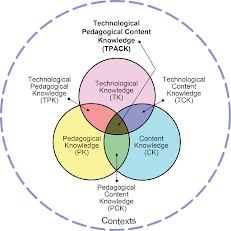 We reviewed the notions of information literacy (IL), Information and Communication Technology (ICT), and Media Literacy (ML); looked at definitions and differences. It was the first time I heard the term TPACK which means Technological Pedagogical Content Knowledge. I was surprised a bit, to be honest.
Last but not least, my favorite part of our sessions, useful tools for the classroom! This week our instructor introduced, Wordcloud, Wordart, Glogster, Canva, Prezi, and Google Drawings. I knew Prezi and Canva beforehand, I also use them in my classroom but the others were new for me. I loved Glogster, you can prepare all your lesson on a page and it would be great for contextualized learning, it would make a useful tool for reading or listening tasks. Wordcloud programs are also useful, I would definitely use them on my blog and in the classroom.
I'm planning to upload detailed reviews for each tool I learned in training and experienced in the classroom. So, make sure you follow, see you next week Learnivores, bye!
Hello teacher ı am Ali Eren Çınar How are you
ReplyDelete